Engineering case study
Migrating a 274-page WordPress site to static HTML without losing an indexed URL
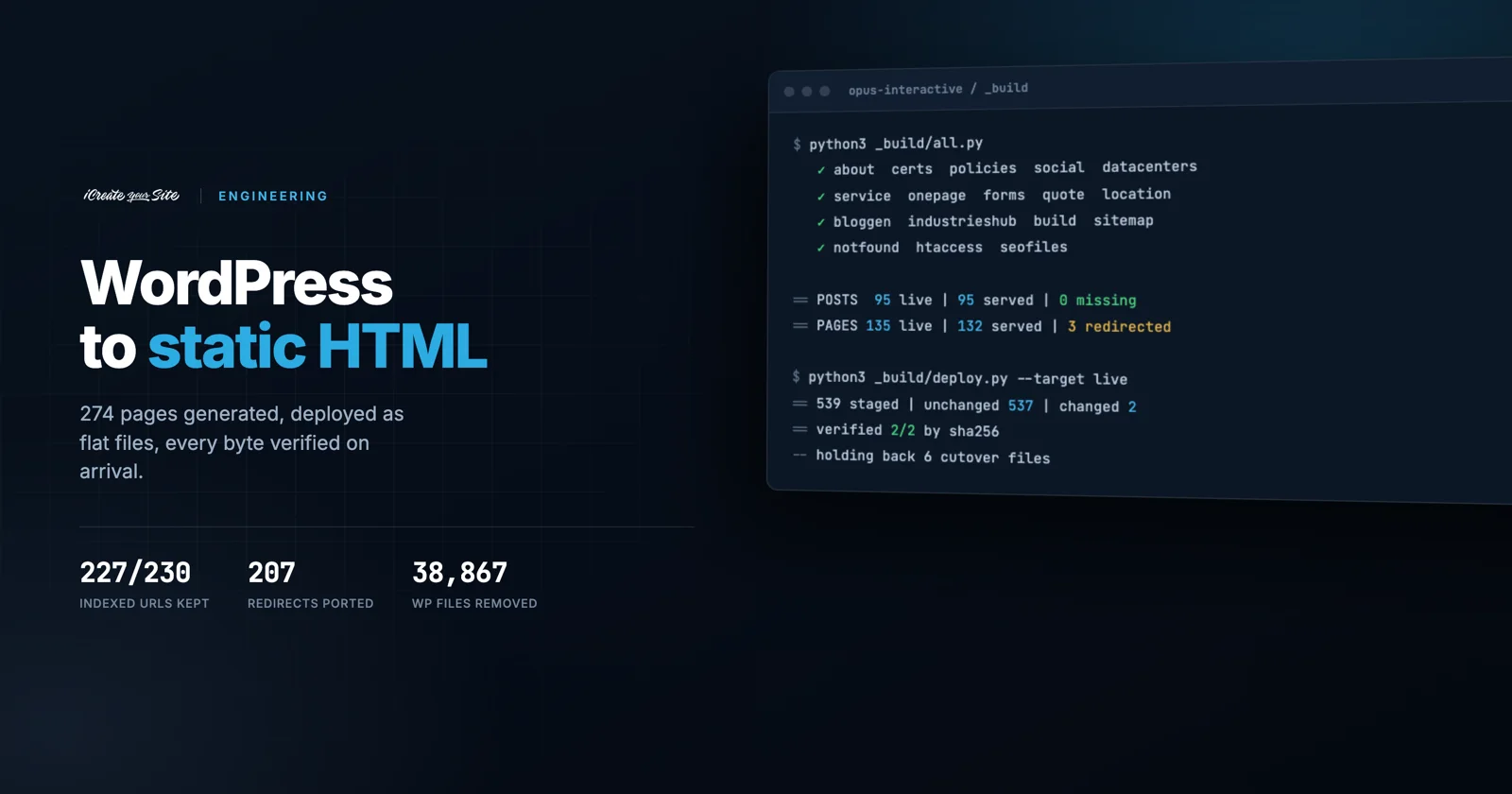
Opus Interactive runs colocation and private cloud out of three US facilities. Their marketing site was 38,867 WordPress files and 3.6 GB of plugin sprawl. We replaced it with a 274-page statically generated site, kept 227 of its 230 indexed URLs on their original paths, ported 207 redirect rules that were about to disappear, and cut over with roughly an hour of analytics gap and no measurable SEO loss.
- Pages generated
- 274
- Indexed URLs preserved
- 227 / 230
- Redirect rules ported
- 207
- Image payload cut
- 65%
- Median TTFB
- 0.41 s
- WordPress files removed from the serving path
- 38,867

The requirement: nothing that ranks may stop resolving
Opus Interactive has been selling infrastructure since 1996. Their buyers are CTOs and IT directors evaluating whether a provider will still be running their workloads in a decade. The site carried nearly thirty years of accumulated search equity: 95 blog posts, 135 pages, and a long tail of URLs from at least two previous site generations.
That made the brief unusual. The design work was the easy half. The hard requirement was this:
Nothing that currently ranks may stop resolving.
A conventional rebuild treats redirects as a launch-day chore. On a domain this old, redirects are the project. Everything below follows from taking that seriously.
Architecture: a build system, not a CMS
We did not replace WordPress with another CMS. The site is generated by a Python build system and deployed as flat files. There is no database, no application server in the request path, and no plugin surface to patch.
Two design decisions did most of the work.
One choke point. Every page is written through a single write_page() function. Sitewide transforms (heading case normalisation, canonical stamping, cache-buster versioning) apply there rather than in eighteen places. Pages that have been hand-edited past the point where regeneration is safe carry a HAND-MAINTAINED marker and are skipped, with dedicated sweep functions to push shared changes into them anyway.
One constant per environment fact. SITE_BASE is the clearest example. The site previews in a subdirectory and lives at a domain root. Rather than maintain two builds, one constant drives the <base href> on all 274 pages, the RewriteBase in .htaccess, and whether the legacy redirect block is emitted at all.
# build.py
SITE_BASE = '/'          # preview: '/opus/'   live: '/'

# deploy.py refuses a mismatch in either direction
EXPECT_BASE = {'preview': '/opus/', 'live': '/'}
if want and base != want:
    sys.exit("REFUSING TO DEPLOY: build.py SITE_BASE is %r but the %r "
             "target needs %r." % (base, tname, want))
That guard exists because the failure is silent and total. A preview-shaped build pushed live would 301 every clean URL into a directory that does not exist on that host. A live-shaped build pushed to preview breaks every relative asset. Neither throws an error; both just serve a broken site.
Auditing every indexed URL before cutover
Before cutover we enumerated every URL the live WordPress site was publishing, from its own Yoast sitemaps, and resolved each one against the generated site.
== POSTS: 95 live URLs, 95 served by the new site, 0 MISSING

== PAGES: 135 live URLs, 132 served by the new site, 3 MISSING
   /opus-intearctive-hybrid-multicloud-solutions-news-and-resources  *** NO PAGE ***
   /infographics/                                                    *** NO PAGE ***
   /cloud-services-duplicate/                                        *** NO PAGE ***
All 95 post URLs and 132 of 135 page URLs resolve at byte-identical paths. The three exceptions are a typo'd slug, an empty archive and a duplicate, each given an explicit 301. Nothing that ranked was left to chance, and nothing was redirected that did not need to be.
The 207 redirects that were about to vanish
This is the part a sitemap diff cannot find, and the part most migrations get wrong.
Opus had a WordPress redirect plugin holding 207 rules built from their 404 logs over several years: an old /articles/*.html generation, category and tag URLs, press release paths, a pre-rebrand service tree. Those rules are PHP. The moment WordPress stops serving, all 207 stop with it.
They are also invisible to the obvious audit. Those URLs do not appear in the sitemap precisely because the plugin already redirects them. A sitemap diff reports the site as clean while 207 live redirects are minutes from deletion.
We ported them into Apache, generated from the client's own CSVs at build time so there is one source of truth:
# htaccess.py — emitted only when SITE_BASE == '/'
for src, tgt, code in legacy_redirects():
    pat = re.escape(src.lstrip('/'))
    a('  RewriteRule ^%s/?$ %s [R=%s,L,NC]' % (pat, tgt, code))
Validating the targets mattered as much as porting the rules. 66 of the 207 pointed at blog category archives that the rebuild had not produced, which would have turned working redirects into 301s to a 404. Rather than retarget them at a generic blog index and lose the topical signal, we generated 34 category archives at their original WordPress URLs, built from each post's full category assignments, marked noindex, follow to match exactly what Yoast had been emitting.
Verified after cutover
/category/vmware/       301 → /opus-blog/category/vmware/
/category/artificial-intelligence/  301 → /opus-blog/category/ai/
/it-services            301 → /managed-it-services/
/careers                301 → /about-opus/careers/
/bare-metal-cloud/      301 → /dedicated-iaas/
All 207 resolve single-hop onto pages that return 200. Zero redirect chains.
Deploying to a host without rsync
The target server had no rsync binary and we were not going to install software on a client's production box to suit our tooling. So we built the part of rsync that mattered: diff by content hash, ship only what changed, verify what landed.
Every deploy ends with the server re-hashing what it received and comparing against the local digest. A deploy that cannot prove what landed is not a deploy, it is an upload.
== 539 files staged
== unchanged 537 | changed 2 | new 0
== uploaded 2 file(s)
== verified 2/2 by sha256
The verifier bug that only appeared with one file
The first end-to-end transport test reported TRANSPORT BROKEN. The file had actually arrived intact. The verifier was lying.
script = 'cd %s || exit 1; while IFS= read -r f; do '
         'if [ -f "$f" ]; then sha256sum "$f"; fi; done'
subprocess.run(ssh + [host, script], input='\n'.join(rels))   # ← no trailing newline
read returns non-zero at EOF on a line with no terminator, so the loop exits before the body runs on the final entry. With a multi-file list the last path was silently never hashed: it looked absent, was re-uploaded on every deploy, and the post-upload verification skipped it. With a single-file list, nothing was hashed at all, which is how a working upload reported as a failure.
One character fixed it. We found it only because we tested the transport with one file before trusting it with five hundred.
Designing the cutover so it could be undone
The site went live in one step, but the step was engineered to be reversible and to minimise the window where the domain served neither site cleanly.
Files ship in sorted order, which puts .htaccess first. Ship everything at once and Apache starts serving the new rules within a second, while the 500 pages those rules point at are still streaming in over the next two minutes. So six files that decide which site the domain serves are held back by default:
CUTOVER_FILES = ('.htaccess', 'robots.txt', 'llms.txt', 'favicon.ico',
                 'index.html', 'sitemap.xml')
index.html is on that list because of something we only knew by measuring. We probed the server's DirectoryIndex order by placing both an index.html and an index.php in a throwaway directory and requesting it:
GET /_diprobe/ → HTML-WINSHTML takes precedence. Dropping our index.html into the docroot would have switched the homepage instantly, with WordPress still otherwise live and no .htaccess change. Assuming the opposite would have produced a half-migrated homepage during what was supposed to be a silent staging step.
WordPress was not deleted. Its 38,867 files stayed on disk, with the front controller and admin paths denied in the new .htaccess, so rollback was two files and a few seconds rather than a 3.6 GB restore. The database was never touched.
Forms, abuse controls, and proving the rate limiter keys correctly
Six forms and a booking widget post to a single PHP endpoint that creates a Salesforce lead, emails the relevant inbox, and sends the visitor a branded confirmation. Because it sends a confirmation to whatever address is submitted, an unthrottled endpoint is a spam relay running on a freshly warmed sending domain.
Three layers, all failing open:
| Layer | Behaviour | Why |
|---|---|---|
| Honeypot | Silent success | Field is hidden from humans, so a filled one is a bot with no human to disappoint |
| Time trap, 2s | 429, asks the visitor to send again | A fast human is real. A silent drop means the visitor reads "your request is in" and nobody receives it |
| Rate limit, 5 per 10 min | 429 with a phone number | Protects the sending domain, not just the inbox |
The rate limiter contained the project's highest-consequence assumption. The site sits behind a WAF, so every request reaches PHP from the proxy's edge address. Keying on REMOTE_ADDR would have put the entire internet in one bucket and locked out every visitor after five submissions, site-wide, silently.
We did not assume the header was right. We exhausted the limit through the proxy, then hit the origin directly and checked which bucket we landed in:
through-proxy #1..#4  422   (validation, counter incrementing)
through-proxy #5      429   ← limited
direct-to-origin      429   ← SAME bucket ⇒ keying on the real client IP
Same bucket means the limiter sees the visitor, not the edge. That is a two-minute test that de-risks a failure which would have been invisible until lead flow quietly stopped.
Answering questions without shipping the whole site to a model
The site answers plain-language questions from Opus's own material. The naive build is to send the question and the corpus to a language model on every request. At 875,085 characters, roughly 219,000 tokens, that is slow enough for a visitor to notice, and it hands the model 1,169 chances to answer from the wrong page.
So the ranking happens first, on their server, before anything leaves it.
kbgen.py builds an inverted index from the finished pages at build time;
search.php scores the query against it with BM25 and sends on only the top
seven passages.
# kb-lib.php — $k = 7 passages, $per_page = 2 from any one page
$N = $idx['N']; $avg = $idx['avg']; $k1 = 1.2; $b = 0.75;
foreach ($idx['chunks'] as $i => $c) {
  $s = 0.0;
  foreach ($idf as $t => $id) {
    $tf = $c['tf'][$t] ?? 0;
    if (!$tf) continue;
    $s += $w[$t] * $id * ($tf * ($k1 + 1))
        / ($tf + $k1 * (1 - $b + $b * $c['n'] / $avg));
  }
  if ($s > 0) $scored[$i] = $s * ($c['k'] === 'core' ? 1.3 : 1.0);
}
Three refinements, each from watching it answer badly:
- Synonyms carry half weight. They broaden a short question without ever outranking a term the visitor actually typed.
- At most two passages from any one page. Without the cap, one long blog post wins every slot and the answer is drawn from a single article.
- City terms only fire when the question names a city. There are 95 local-SEO pages built from the same template; unconstrained, they flood every answer.
| Per question | Value |
|---|---|
| Corpus indexed | 1,169 passages, 875,085 chars (~219k tokens) |
| Sent to the model | 7 passages, ~5,240 chars (~1,310 tokens) |
| Share of corpus | 0.6% |
| Embedding vectors | none |
| Index on disk | 2 MB JSON, read by the same PHP process |
| Measured response | 2.0 s end to end |
No vector database, no embedding call per query, no second service to keep alive. Ranking is arithmetic over term frequencies, which shared hosting does perfectly well. The model is reached over a plain HTTP API and is not special to this design: any provider with an API works, and swapping one is a change to a single function.
The payoff is latency and grounding, not economy. A 1,310-token prompt returns in about two seconds where a 219,000-token one would not, and a model handed seven matching passages has far less room to answer confidently from an unrelated page. On a site whose buyers arrive asking about FISMA and SOC 2, being wrong quickly is worse than being slow.
Performance: auditing by total bytes, not per page
A static site removes the application server from the request path, which is most of the win. The rest was image delivery.
Third-party page audits flagged a 652 KB hero on the page being tested. Auditing by total bytes served rather than per page told a different story:
before after (WebP q80)
The audit named a file on 4 pages. The largest actual cost was a pre-footer background on 268 pages, which no single-page report surfaces. Converting the set cut 5.4 MB to 1.9 MB, a 65% reduction, with no markup rewrite beyond repointing references.
| Measured on the live site | Value |
|---|---|
| TTFB, interior pages | 0.41 s |
| Total response, interior pages | 0.61 s |
| Homepage HTML, uncompressed | 155 KB |
| Homepage HTML, gzip | 39.6 KB |
| Homepage image payload | 1.66 MB across 26 images |


Two accessibility defects a visual review cannot catch
An agent-accessibility audit surfaced two defects that a visual review would not catch.
The first was a genuine keyboard trap. A decorative globe container carried aria-hidden="true" to hide the photo, but three interactive location buttons lived inside it. Keyboard users could tab onto controls that screen readers had been told did not exist. The photo already had alt="", so the correct fix was removing aria-hidden entirely rather than making the buttons unfocusable.
The second was invalid ARIA on six animated counters. A bare <span> has an implicit role of generic, which does not permit an accessible name, so the aria-label carrying the final value was being ignored. Adding role="img" makes the name valid and means assistive technology announces "200+" rather than whatever digit the odometer is mid-animation on.
- <span class="accent counter" data-count="200" aria-label="200+">
+ <span class="accent counter" data-count="200" role="img" aria-label="200+">
Five defects, and the checks that caught them
Every one of these was found before launch, by a check that produced a number we could compare against an expectation. None was found by looking at the site. That is the part worth copying, so the detection method is listed beside each defect.
| Issue | Root cause | Caught by |
|---|---|---|
| Every deep missing URL returned 500, not 404 | MultiViews resolves /contact to contact.html and passes the rest as PATH_INFO, so REQUEST_FILENAME.html exists and the clean-URL rule recurses until Apache aborts | Post-deploy URL sweep |
| Sentence-case pass lowercased proper nouns | A sitewide heading transform with no proper-noun protection: "Shannon hulbert" on the leadership page, "manassas" in six service headings | Client review, then a sitewide sweep |
| Cache-buster grew without bound | [a-z0-9]+ in the version-rewrite regex did not match the hyphen in a new version string, so each build appended again: ?v=20260928-live-live-live-live | In-browser stylesheet check |
| A content fix silently reverted | Edited generated HTML instead of the source JSON; the next build overwrote it and the file then matched the server, so it never appeared in the deploy diff | Changed-file count being one lower than expected |
macOS tar smuggled AppleDouble files | Extended attributes produce ._name siblings that Apache will serve | Listing the probe directory after the first transport test |
The deploy manifest alone caught two of them, purely because the changed-file count did not match what we had predicted. A build pipeline that reports counts you can predict is worth more than one that reports success.
Stack
- Generation — Python 3, 18 generators, 9,441 lines, no framework
- Frontend — hand-authored HTML and CSS, 5,270 lines, no build step, no JS framework
- Serving — Apache with a generated 306-line
.htaccess, behind a WAF and CDN - Dynamic — PHP 8.4 endpoints for forms and search, config held outside the docroot at
0600 - Integrations — Salesforce OAuth client credentials, Resend, Calendly v2, an LLM API
- Deploy — sha256 manifest diff over
tarandssh, additive, verified
Before and after
| Before | After | |
|---|---|---|
| Platform | WordPress, 38,867 files, 3.6 GB | 274 static pages |
| Request path | PHP + MySQL + plugin stack | Flat files |
| Attack surface | Plugins, themes, admin, XML-RPC | Two PHP endpoints |
| Indexed URLs | 230 | 227 identical, 3 redirected |
| Legacy redirects | 207, in a plugin | 207, in Apache |
| Image payload | 5.4 MB | 1.9 MB |
| Analytics | GA4 + GTM | Identical, both properties preserved |
Call tracking, session recording and both ad pixels survived the migration untouched, because the tag container was carried across intact rather than rebuilt. Verifying what was actually inside it before touching it is the only reason that held.
Working on something with these constraints?
Migrations where the URLs matter, build systems for sites too large to hand-maintain, or integrations that need to survive a platform change. If that is the shape of your problem, we should talk.
Start a conversation